How to return a Walmart online order: store, mail, or pickup
The four ways to return a Walmart.com order, how to start the return, when a Walmart+ pickup needs you at home, what can't be mailed, and how long refunds take.

This guide follows Walmart’s US help pages and return policy as read on October 20, 2026. It covers items Walmart sold and shipped; Marketplace sellers can have their own rules.
How do you start a return for a Walmart.com order?
- Open Purchase History in your Walmart.com account or the app.
- Select View details for the item, then Start a return.
- Check the items to return and select Continue.
- Pick a reason, then choose a refund or a replacement.
- Choose a return method and select Submit.
Walmart emails you the label or barcode, and you can also print it from Purchase History. If you checked out without an account, Walmart’s policy points you to walmart.com/returns, and it can look up an online order by phone number or email if the order number is gone.
Which return method should you pick?
Walmart offers four methods. The app shows which ones your item qualifies for when you start the return.
You would rather...
- Not repack anything Take it to a Walmart store with the barcode or return email
- Not leave home Schedule a pickup from where it was delivered
- Ship it yourself Print the label and drop the box at USPS or FedEx
- Ship it without a printer Bring the packed item to a FedEx Office; no label needed
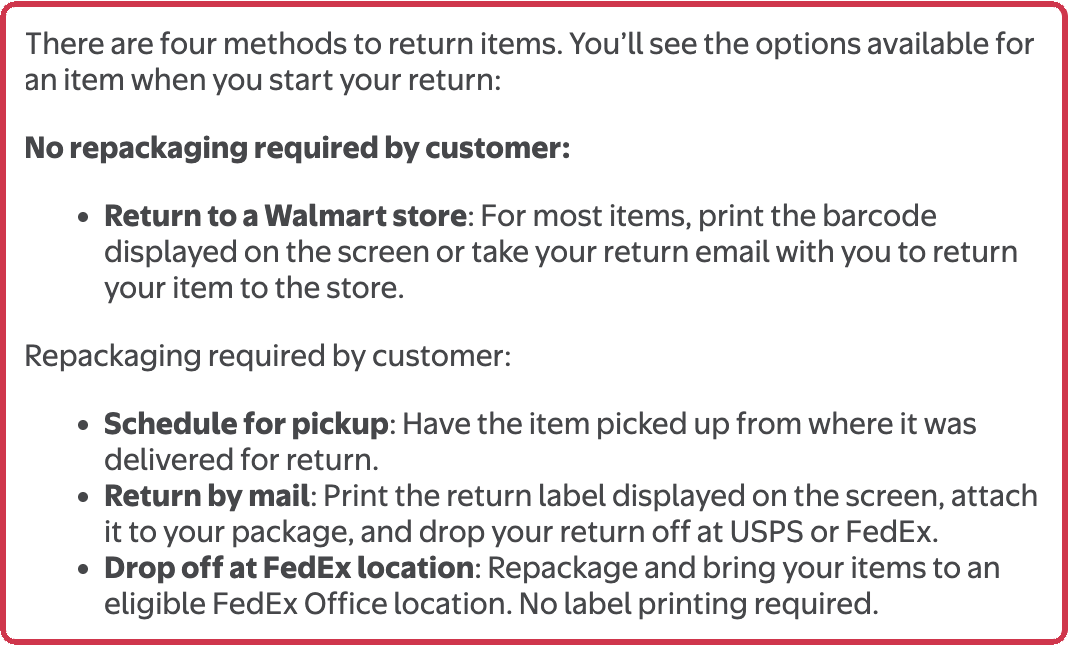
At a store you can use curbside drop-off without leaving your car, or bring the item to the Customer Service desk. Neither needs printing or repacking. If the item is oversized or you can’t get it to a carrier, Walmart says to contact customer care through its chat.

Do you have to be home for a Walmart return pickup?
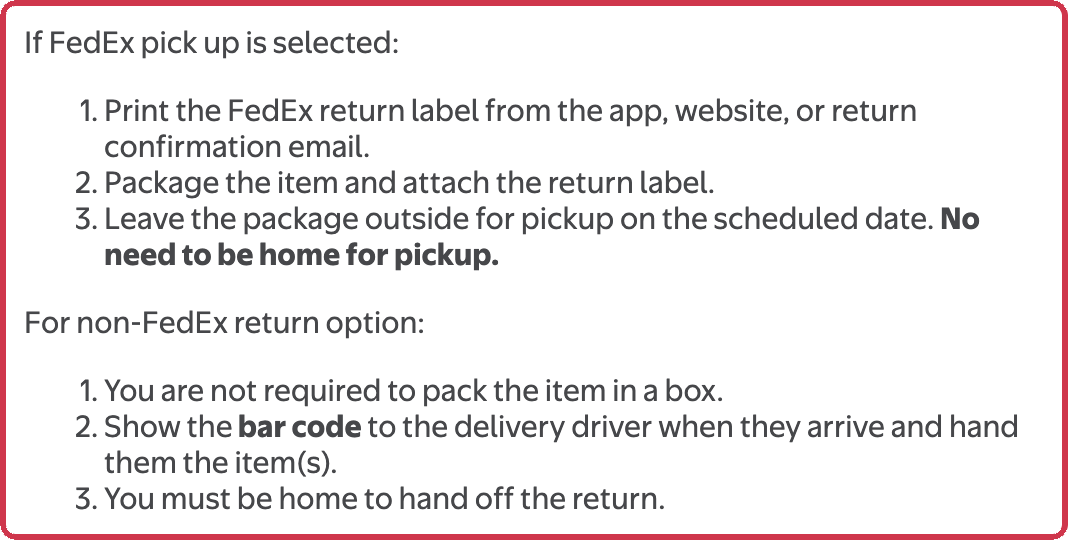
It depends on who picks it up. Walmart’s policy lets you schedule a pickup with FedEx, and Walmart+ members get Returns from Home in the app, which can add a pickup by Walmart. Some members see only the FedEx option.
| Pickup type | Box and label | Do you need to be home? |
|---|---|---|
| FedEx pickup | Pack the item and attach the FedEx label | No; leave the package outside on the scheduled date |
| Walmart pickup (non-FedEx) | No box needed; show the barcode to the driver | Yes; you hand the item over yourself |
To cancel a scheduled pickup, go back to the order in Purchase History and select Cancel return.
How long does a Walmart refund take?
Walmart refunds online orders to the original payment method. Its Refunds page gives these typical times:
| You paid with | Refund typically within |
|---|---|
| Credit or debit card | 7 days |
| Pay by Bank, PayPal, OnePay Later | 7 days |
| Walmart gift card, Walmart Cash, Walmart Balance | 3 hours |
Walmart’s pages disagree on EBT: the Refunds page and the return policy say an EBT card refund typically comes within 7 days, and the Free Returns page says 3 hours. Outbound shipping charges aren’t always refunded. If Walmart can’t refund the original card, an online purchase is refunded to Walmart Balance.
What can’t you return by mail or in a store?
| Item | Rule in Walmart’s policy |
|---|---|
| Perishable online orders (fresh food, frozen) | Can’t be mailed; start the return on Walmart.com or the app for a refund |
| Photo prints, personalized items, photo products | Return to a store, or contact Walmart; don’t mail them |
| Items containing fuel, propane, or other flammable liquid | Don’t mail them; drain them before returning |
| Freight, oversized, or heavy items | Can’t go back to a store |
| Some Marketplace items (odd-sized, freight, hazardous, collectible, luxury) | Not eligible for a store return |
How long do you have to return a Walmart online order?
Walmart’s policy gives 90 days “after purchase or upon receipt” for most items, with shorter windows for some: 2 days after delivery for major appliances (30 days if still unopened, uninstalled, undamaged, and factory sealed), 14 days for most wireless phones, and 30 days for consumer electronics and most Marketplace items. Most items bought from October 1 through December 31 can be returned until January 31, with exceptions such as wireless phones and major appliances. Details for the holiday window are in Walmart’s 2026 holiday returns, and store purchases without a receipt are covered in returning to Walmart without a receipt.
Walmart’s pages do not say whether a mailed return is refunded when the carrier scans it or when it reaches Walmart, and the shopper pages don’t explain when Walmart lets you keep an item instead of sending it back.
Sources
- Start an Online Return - Walmart.com (checked )
- Refunds - Walmart.com (checked )
- Walmart+ Benefits – Returns from Home (checked )
- Free Returns | Walmart.com (checked )
- Walmart Policies (Return Policy, updated October 9, 2026) (checked )
- Cover photo: Mike Mozart, CC BY 2.0